Achieving Flow
Keeping a smooth stream of agent work
The problem
I've been using Claude Code to build an AI stylist application, with the goal of having AI generate as much of the code as possible.
One of the challenges I encountered early on was getting Claude to work on multiple development tasks in parallel without getting stuck, losing track of work in progress, or requiring constant intervention.
Claude's default approach through the Claude Code VSCode plugin is to run work in a serial loop. This limited how quickly I could build large features. Its next instinct was to run parallel work as background terminal tasks. This increased its throughput, but made it harder for me to keep track of which tasks had completed, what problems they faced, and whether they were stalled.
Over time, I developed a framework that delegates the responsibilities of accomplishing a large task to separate agents that are easy to audit. It is currently composed of
- A main Claude conversation that handles planning and delegates implementation of larger tasks to a project lead
- A project lead that delegates focused work to background agents, reviews and integrates their work, and reports back to the main conversation when necessary
- Background agents that accomplish specific, scoped tasks
Here's how I arrived at that approach.
1. Starting with background agents
My first approach was to have Claude launch background agents to work on separate development tasks in parallel.
This allowed me to easily see whether a background task was finished, still working, or stuck needing input.
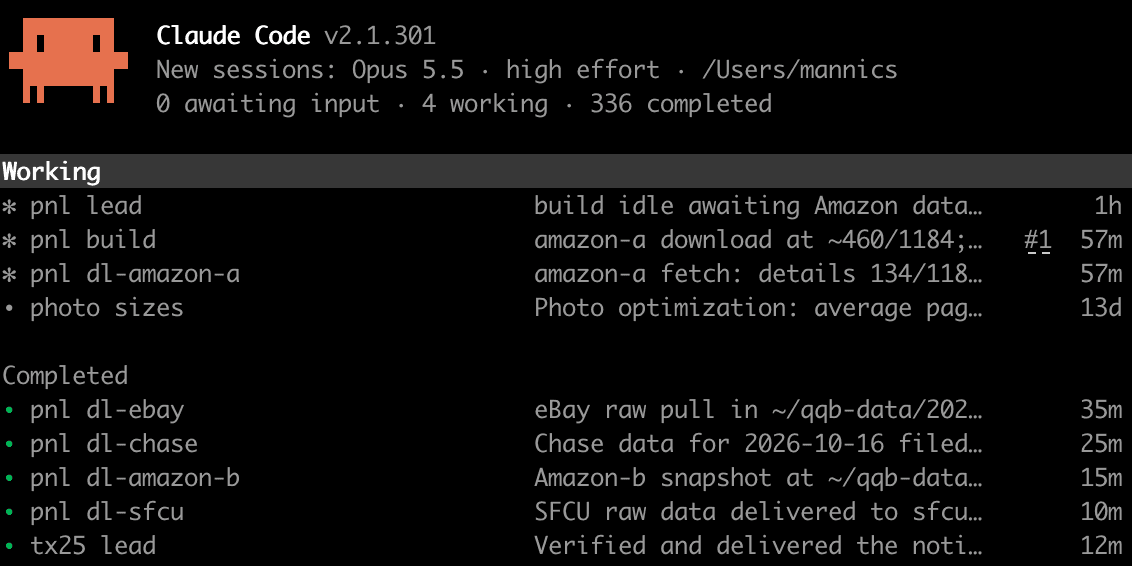
Clicking into any given agent gave me its full conversation history, if I needed to investigate some part of its work.
When an agent completed its task, it would message the main conversation, which was responsible for reviewing the result and integrating the changes into a single working branch.
This was a useful improvement over having Claude launch background terminal processes, but I ran into a reliability problem.
2. Adding a watchdog to recover stalled work
Occasionally, background agents would stall or fail to report their results to the main conversation.
This meant that even though work was running in parallel, I still needed to check on agents manually to make sure tasks were progressing.
To address this, I introduced a watchdog that would wake up the main conversation every 15 minutes and instruct it to check on the background agents.
The main conversation could then inspect their status and take action when an agent was stuck or had finished without successfully reporting back.
This worked reasonably well. I no longer needed to continuously monitor the agents myself, and the main conversation could recover from some of the coordination failures that would otherwise leave work unfinished.
But solving this problem exposed another one.
3. The main conversation became the bottleneck
As I increased the number of tasks running in parallel, my main conversation became increasingly cluttered.
It was responsible for several different kinds of work:
- Planning upcoming features and deciding what to build next.
- Delegating implementation tasks to background agents.
- Checking on agents and responding when they stalled.
- Reviewing completed work and integrating changes.
- Maintaining enough context to coordinate all of these activities.
The main conversation was supposed to be where I worked through design decisions and planned future development. Instead, much of its activity consisted of operational messages about work already in progress.
Even when I wasn't personally involved in reviewing every change, those reviews and integrations were still happening in the same conversation I wanted to use for planning.
I needed a way to preserve visibility into ongoing work without making the main conversation responsible for managing every implementation detail.
4. Introducing a project lead
My next change was to introduce another layer of delegation: a background agent I call the project lead.
Instead of having the main conversation supervise individual implementation agents directly, it delegates a larger unit of work to a project lead.
The project lead then takes responsibility for breaking that work into smaller tasks, launching background agents, supervising their progress, reviewing their results, and integrating the completed work.
The project lead is launched with a brief prepared by the main conversation. It also has access to the main conversation's history, giving it the broader context behind the task it's been assigned.
In turn, the project lead prepares briefs for the background agents it supervises.
This creates three levels of responsibility:
- Main conversation
- Project lead
- Background workers
A watchdog checks in with the project lead every 15 minutes to make sure none of its agents are stuck, and with the main conversation every hour to see if the lead is stuck or needs any input.
The watchdog cancels itself when the project lead reports that it has finished all its tasks or at a defined time (e.g. tomorrow morning). Giving the watchdog a time limit prevents needless turns if the project is blocked on human input and the human never returns.
---
name: orchestrate
description: Turn work already scoped in the conversation into parallel background Claude sessions ("tracks"), each with a written brief, a STATUS.md board, an open reply channel, a per-track model choice, and a quality gate before anything is accepted. It always starts by proposing the breakdown for the user's approval and launches nothing until they approve. Use it whenever the user says something like "maybe we should delegate some of this in parallel now", "how would you break this into tracks", "use background agents", "orchestrate this", "fan out", "don't block the main thread", or when a task has two or more independent parts that each take more than a few minutes (separate data sources, components, networks, accounts). Not for short read-only lookups whose result the current turn needs; those belong to the in-process Agent tool.
---
Orchestrate: parallel background tracks
Typical entry: the user has already gathered context in this conversation and now asks to delegate part of the work in parallel. The first output of this skill is a proposed breakdown, not a launch. Nothing starts until the user approves.
You are the orchestrator. Workers are separate claude --bg sessions, one per track. Your job is to split the work well, brief each worker so it can run unattended, keep the board current, open the reply channel yourself, gate every deliverable, and assemble the result. The user reviews deliverables and gates, never worker transcripts.
1. Propose the split and stop for approval
Split by what is genuinely independent: a data source, a component, an account or network, a scene. Two workers fighting the same hostile website is a bad split; one worker per website is a good one. A stage that needs every prior result is a barrier, so pipeline per item instead of adding barriers. Work you will do yourself (spot-checks, assembly, anything blocked on other tracks) is also a track, so the user sees the whole plan.
Present the proposal as one table: track, what it produces, which source or component it owns, model with a one-phrase reason, and what it is blocked on. Add the one or two things you are unsure about (a split that could go either way, a model you might raise). Then stop and wait for the user's approval or edits. Splits and model choices are the decisions that are hardest to undo, and the user usually knows things about the work that are not in the conversation yet. Only after approval do you write briefs and launch.
1b. Use a lead when the user wants the main chat clean
Integration work (reviewing worker output, nudging, relaunching) produces a stream of messages. When the user wants the main conversation kept to decisions and status, launch a lead: one background session that owns the board, launches and gates the tracks, and talks to the main chat only for things only the user can do (sign-ins, decisions, gate reviews). The point is a clean main chat, not a smaller context for the lead, so give the lead the whole conversation: export it with scripts/export_transcript.py <session.jsonl> <out.md> (it masks text through the standalone piimask tool, ~/piimask, when installed; piimask is also a stdin filter, e.g. DRV_FILTER=piimask for the browser tools) and make reading it the first line of the lead's brief. Refresh the export whenever the main chat adds decisions.
2. Pick a model per track, by complexity, defaulting up
- Reasoning loops, prompts, memory or data semantics, unfrozen contracts, concurrency, anything that will be reviewed for correctness, or any scraping of hostile sites that needs adaptive problem-solving: Opus-class or the session's top model.
- Genuinely mechanical execution against a frozen spec or playbook: Sonnet.
- Trivial bulk transforms: Haiku.
- Orchestration and final quality gates: the session's top model, meaning you.
Wall time matters as much as cost: a review bounce costs a whole build, review, fix cycle. Raise a track's model after one bounce, not after several. Name the model in the launch message so the user can object.
3. After approval, write one brief per track
Copy assets/brief-template.md to <project>/<work-dir>/brief-<track>.md and fill it in. A worker has none of your conversation context, so the brief must carry the facts, the sources and their known gotchas, the tooling rules, the deliverable format, and an effort cap. Put the isolation rules in explicitly: its own browser profile, its own output directory, its own git worktree if it edits code, so parallel workers never collide with each other or with you.
Two sentences belong in every brief, verbatim in spirit:
- "The orchestrator will message you shortly after launch to open the reply channel; direct questions and your completion report there, then stop."
- "Do minimal self-QC: the orchestrator and the user review the deliverable; ship as soon as it is complete and internally consistent." (Deep self-QC only when the user asks for it.)
Pre-answer likely questions in the brief (approvals, thresholds, what to do if a source is hostile) so workers do not park on them.
4. Launch, then verify it is alive
From the project directory:
claude --bg --model <opus|sonnet|haiku> --permission-mode auto --name "<track-name>" "Read <path-to-brief> and carry out the task exactly as described. Deliver <files>. The orchestrator will message you to open the reply channel; send your completion report there."There is no agent subcommand. claude agent --bg ... exits immediately with "exit 1 before init" and litters the fleet view with dead rows. About twenty seconds after launch, confirm the session shows state: working:
claude agents --jsonIf it is missing or exited, fix the command and relaunch under a fresh name. If the auto-mode safety check refuses the launch itself, don't work around it; tell the user what you were launching and why, and let them decide.
4b. First check, about 10 minutes after launch
Most early failures are permission prompts and sign-in walls, and they look like work: the session stays listed as working or idle. About 10 minutes after launching (schedule a one-shot check if you won't be around), run:
python3 ~/.claude/skills/orchestrate/scripts/liveness.py --prefix "<run prefix> " --board <work-dir>/STATUS.mdLook at denials (auto-mode refusals found in the transcript) and any PARKED/BLOCKED rows, and fix them while the user is still around. A launch that goes straight to waiting is a block, not work.
5. Open the reply channel yourself
A worker can only message a session it can name, and it does not know yours. So never tell a worker to "find the orchestrator". Instead, once the session is listed under its name, send it a message with an idle subscription:
SendMessageto<track-name>,notify_when_idle: true, with a first line like "Reply channel open: I am the orchestrator for your <track> track", plus any facts that arrived after the brief was written.
Receiving that message hands the worker your address. The idle notice is your completion signal. Never poll ListAgents in a loop and never send "are you done?" messages.
6. Keep the board
Copy assets/status-template.md to <work-dir>/STATUS.md. One row per track: track, worker (session name and id), model, state, deliverable, notes. States: in progress, ready for review, approved, dropped. You keep it current; workers never edit other rows. Record scope changes and relaunches in the notes column so the history is legible later.
6b. Unattended runs: liveness and watchdogs
Arm a watchdog whenever tracks will run while nobody is watching (overnight, or a long block of work); disarm it per §9b.
Liveness: never trust the state alone. Sessions get stuck while listed as working or idle. scripts/liveness.py combines the session state (claude agents --json --all), the transcript's last-modified time (~/.claude/projects/<cwd-slug>/<sessionId>.jsonl is rewritten on every message and tool call, so it is the last-action time), the track's board heartbeat, and permission denials in the transcript. A track is STUCK when it isn't done and neither its transcript nor its heartbeat changed for 30 minutes, whatever its state says. Have every worker update its board line (<track> | <state> | <ISO time> | <note>) at every step; that line is its heartbeat. During download-type work, output files growing is a further signal.
Two layers, both cheap:
- Lead watchdog, every 15 min: a shell loop, free unless it acts.
scripts/watchdog.sh --target "<lead name>" --prefix "<run prefix> " --board <work-dir>/STATUS.md --flag <work-dir>/watchdog.on --every 15 --until 09:00(arm:touchthe flag, start it withnohup … &). It logs one liveness line per pass and, when the lead is idle while work is outstanding, or STUCK while busy, messages it (a one-shot headlessclaude -p --model haikuthat calls SendMessage). Never wake an idle background session withclaude --bg --resume: an idle session is still running, so resume starts a copy, a second lead acting in parallel (2026-10-15). Resume only a session that has exited. It stops at--until, when the flag file is removed, or when every track is DONE. Dry-run it once by hand before arming (a short--untiland no--target). - Main-conversation check-in, about every 50 min: pass
--checkin "<main chat session name>" --checkin-every 50to the same watchdog. It messages the main chat with a full check-in request (read the board and log, run liveness, unstick or take over the lead), and escalates at once (at most every 30 min) when the lead is STUCK. It messages the main chat (50 minutes keeps each wake inside the 1-hour prompt cache) and sends a "morning summary due" message when it stops. Don't useCronCreatefor this: a cron job whose minute arrives while the chat is busy is skipped, and a one-shot pinned to a date never comes back (2026-10-15). Messages queue: they wake an idle chat and arrive mid-turn in a busy one. Each check-in reads the board and the watchdog log, runsliveness.py, messages the lead if it is stuck, and, if the user said so, takes over work the lead and tracks provably cannot do without the user. It never re-launches what the safety check refused (§4). - Without a lead, the orchestrator is the one the check-ins wake; the 15-minute layer then only logs and nudges tracks.
- What each layer checks besides liveness: the lead, on every tick, re-evaluates the split (anything waiting that needn't, long tasks that can be split, independent parts in an upcoming serial stretch) and launches what can start. The main-chat check-in gives a second opinion on the split and, only when a deliverable was verified or a surprising claim arrived since the last check-in, spot-checks ONE of them against the raw data (masked counts/totals only); otherwise it skips the spot check. Learn the data's structure before judging (2026-10-15: a deliberate CSV + statement double load looked like duplicates), and raise doubts as questions to the lead, not findings.
- Doorbell + queue: a message is the doorbell, the board (or pending list) is the queue. Write every piece of work down before ringing; a message is lost if the receiving session closes, the board isn't. Time-critical checks belong in the shell layer, which never waits on any chat.
- Tracks that drive signed-in browser windows (banks, seller portals): use the FIFO window tools in
~/webshot/fifo/(README there). Always launch windows throughlaunch.sh, give each site its own window, and runkeepalive.shovernight for sites with short or unproven session lengths (banks every 5 ± 2 min, others 25 ± 5), with aninusemarker that whoever is using the window sets first, so reloads never collide with work.
7. Change scope by message, not by relaunch
When the split changes mid-flight (for example, a new track takes over a source that two workers were both fighting), send each affected worker a short scope-change message saying what to drop and what the new deliverable is. Update the board in the same breath.
8. Gate every deliverable
When an idle notice arrives, read the deliverable and spot-check it against the primary source before accepting: two or three items re-verified by you, not by the worker. Mark the row ready for review, tell the user what you checked, and let the user approve the gate. Nothing merges or gets acted on without a green gate. If a deliverable bounces, send the worker the specific defect; after one bounce, consider raising its model.
9. Stop accepted sessions promptly
An idle background session shows "needs input" in the fleet view whether it is parked or finished, and clicking a finished row revives it as a duplicate worker. Once a track is accepted, run claude stop <id> and mark the row.
9b. Stop the clock when only the user is left
When nothing is running and the only thing left is the user's feedback or decision, disarm the watchdog (remove its flag file) and drop any scheduled self-wakes (CronDelete the remaining check-ins). The user may be gone for hours or days, and a timer that keeps waking an idle orchestrator or lead re-reads its whole context each time for nothing. The user's next message wakes the relevant thread anyway. Re-arm only when a track is running again.
10. Assemble
Merge the accepted deliverables into the final result yourself. The user gets one outcome and one recommendation, with the board as the audit trail.
See references/failure-modes.md for the mistakes this procedure exists to prevent, with the incident behind each one.